
Distributor Management Software Pricing: What Determines the Cost?
When you compare distributor management software, most businesses ask a question: How much does it cost? The subscription price is a starting point. That price does not always show the whole investment. Depending on the provider, the total cost can also cover implementation, data migration, employee training, integrations, extra modules, and ongoing support.
These differences matter when you manage a network of distributors, field sales representatives, and retail outlets. A system that works for a business that has five sales representatives and a simple distribution process may not fit a company that operates in territories, handles hundreds of SKUs, or coordinates several distributor networks. Understanding distributor management software pricing helps you evaluate vendor proposals, spot extra costs, and choose a system that fits your operational requirements.
In this blog, we explain the main factors that determine distribution software pricing, how to calculate the total cost of ownership, and what to ask vendors before requesting a quotation.
1. Number of Users and Team Size
The number of users is one of the first things to check when you evaluate distributor management software cost. Many vendors charge per user, while others offer fixed packages, tiered plans, or custom pricing. The actual model depends on the vendor.
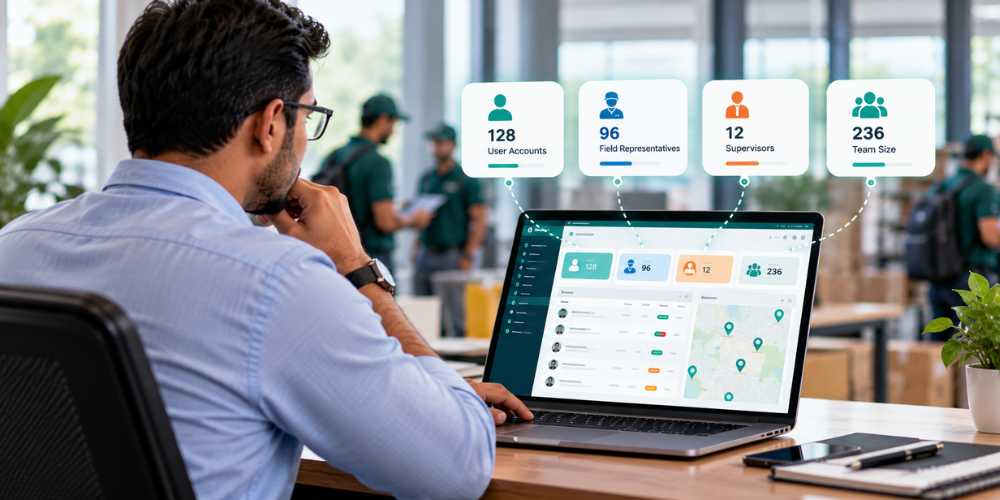
A company with 15 field reps may need a different subscription arrangement from a distributor network with 100 reps, 10 supervisors, and several administrators. Before you compare quotations, work out who needs access to the platform. Your user groups might include:
-
Field sales representatives: Record outlet visits, capture orders, report collections, and submit daily sales reports.
-
Sales managers: Monitor territory coverage, review sales performance, and track team activities.
-
Distributor staff: Manage relevant distributor records, stock information, and order workflows where supported.
-
Administrators: Configure users, permissions, territories, and reporting requirements.
Not every platform charges all these roles at the same rate. Some may count every login as a paid user, while others may offer different access levels.
What to check before choosing a plan
Ask the provider whether the subscription has a minimum user requirement, whether manager accounts get charged separately, and how adding users changes the bill. Also worth estimating your future team size now rather than later. If you plan to expand into new territories, hire more reps, or onboard more distributors, find out how those changes hit your subscription before you sign anything. The goal is a pricing arrangement that fits your current team without making planned growth unnecessarily expensive down the road.
2. Features and Modules Included in the Subscription
Distributor management software is not a single, standardized product category. Different platforms support different parts of the distribution process, so their prices are not always directly comparable. One solution may focus on distributor records and order processing. Another may combine distribution workflows with a field sales automation system, inventory visibility, retail execution, and sales analytics.
The more closely a platform matches your business processes, the less likely you are to need separate tools or costly workarounds. However, you should not assume that every advertised feature is included in the base subscription.
Features that can influence pricing
Depending on the product, your requirements may include:
-
Distributor and party management: Maintain distributor, retailer, and customer records.
-
Order management: Capture orders, track order status, and improve order visibility.
-
Inventory management: Monitor available stock, stock movement, and SKU-level availability where supported.
-
Secondary sales tracking: Understand sales from distributors to retailers.
-
Field sales automation: Record visits, orders, collections, and daily activities.
-
Beat planning and route management: Organize territory coverage and assign outlet visits.
-
Reporting and analytics: Review sales performance, collection trends, and field activity.
-
Attendance and expense management: Manage attendance records, leave requests, and field expenses.
-
Integration capabilities: Exchange information with accounting systems, ERP platforms, or other business applications.
Some vendors include several capabilities in one subscription. Others charge separately for advanced analytics, additional modules, or specialized workflows.
How to compare feature-based pricing
Start by writing down what your business actually needs, not what the feature list promises. A business that mainly needs distributor order visibility doesn't need every field sales feature available. An FMCG company wrestling with missed outlet visits, inaccurate secondary sales reports, and poor distributor stock visibility probably needs something more comprehensive. Request a clear breakdown of what's included versus optional. That's what makes it possible to compare the distributor management system cost against the operational requirements it's actually supposed to solve.
3. Setup and Implementation Costs
Software implementation involves more than creating user accounts. The provider may need to configure the platform around your distribution network, reporting structure, and existing sales processes, and that's where the real work sits. Implementation costs vary with how complex the rollout actually is and how much assistance comes bundled into the subscription versus billed separately.

A business operating from one location with a small sales team needs relatively straightforward configuration. A company with multiple distributors, regions, sales hierarchies, and established reporting processes needs more preparation up front and should budget for that accordingly.
What implementation may include
Depending on the agreement, setup services can cover:
-
Initial account and system configuration.
-
User creation and access permissions.
-
Territory, beat, and route configuration.
-
Distributor and retailer data preparation.
-
Product and SKU master setup.
-
Sales reporting configuration.
-
Workflow testing and validation.
-
Initial rollout assistance.
Some providers include these services in their subscription, while others charge a separate implementation fee. Your internal team may also need to invest time in preparing spreadsheets, checking customer records, correcting duplicate entries, and validating product information before migration.
4. Integration With Existing Business Systems
Plenty of businesses already run accounting software, an ERP, a warehouse management system, or other tools to manage daily operations. Bringing in distributor management software often means these systems need to talk to each other. Product details might need to move between the ERP and the field sales app. Order records or payment collection information might need to reach another system entirely. Whether that integration adds to the price depends on the vendor's own capabilities, which systems are involved, and how complex the actual data exchange turns out to be.
What determines integration costs?
-
Available connectors and APIs: A provider may already support the system you use. An existing, supported integration can require less work than a new custom connection.
-
Data complexity: Integrating product codes, distributor records, price lists, order information, and payment records requires careful field mapping and validation.
-
Integration frequency: Some workflows require periodic synchronization, while others need more frequent updates. The appropriate approach depends on the business process and technical capabilities.
-
Custom requirements: Special approval rules, non-standard data formats, and legacy systems can increase development and testing requirements.
-
Ongoing maintenance: Changes to either connected system may require updates, monitoring, or troubleshooting.
What to confirm with the vendor
Ask whether each required integration is already included in the quoted price or billed separately. Confirm whether recurring maintenance fees exist and which records sync in each direction. Also understand how the platform handles failed synchronizations, duplicate records, and temporary connection problems; these edge cases matter a lot when reps depend on accurate product information and timely order updates to actually serve retailers well. Integration should get evaluated as part of the overall distributor management software pricing from the start, not bolted on as an afterthought once the contract's already signed.
5. Training and Ongoing Support
A distributor management platform only earns its keep when the people running daily operations can actually use it right. Reps need to know how to record outlet visits, submit orders, report collections, and get through their daily activities without friction. Managers need to know how to read the reports and spot an issue before it becomes a bigger one. Administrators may need training on user permissions, master data, and system configuration. How much training and support comes bundled into the package affects the real cost, whatever the sticker price says.
Compare support arrangements.
Not all support packages offer the same level of assistance. Check:
-
Available support channels, such as email, phone, or chat.
-
Support hours and expected response times.
-
Assistance during initial implementation.
-
Procedures for reporting technical issues.
-
Charges for additional training or configuration.
-
Availability of help when the team expands.
For field sales operations, timely support matters. If representatives cannot submit orders or managers cannot access important reports, the disruption can affect daily work. However, the most expensive support package is not necessarily the right choice. Match the level of assistance to your team's size, operating hours, technical capability, and business requirements.
6. Contract Terms, Billing, and Renewals
The subscription price is only one piece of the commercial agreement. Billing frequency, contract length, renewal conditions, and user expansion rules all shape what you actually pay over time. A vendor with a lower annual subscription can have very different contractual terms than one offering monthly billing, so the sticker price alone won't tell you which deal is actually better. A real comparison weighs both the total amount and the flexibility of the agreement itself.
Contract details to review
-
Monthly versus annual billing: Determine whether the provider offers both options and whether annual payment changes the overall cost.
-
Minimum commitment: Check whether the contract requires a minimum subscription period and what happens if your requirements change before it ends.
-
Additional users: Confirm how new representatives, managers, and administrators are priced during the contract.
-
Renewal terms: Ask when the agreement renews, how much notice is required to cancel, and whether renewal pricing can change.
-
Configuration changes: Establish whether changes to territories, reporting structures, or workflows are included or billed separately.
-
Data access and export: Understand how you can retrieve your business records if you discontinue the service.
-
Cancellation terms: Review the process for ending the subscription and any applicable charges.
Do not rely solely on verbal assurances. Request written confirmation of the commercial terms and any conditions that could affect future costs. A clear agreement makes it easier to forecast your software budget and avoid unexpected charges when your distribution operation changes.
7. Data Migration and Data Quality
Moving off spreadsheets or an existing application usually means transferring distributor records, retailer information, product masters, price lists, and historical sales data, and how messy that data is drives a lot of the initial cost. If your records are clean and consistently structured, migration is fairly straightforward. If multiple spreadsheets have duplicate outlets, inconsistent distributor names, outdated contact details, or different SKU codes across each one, expect to spend real time cleaning that up before migration even starts.

What can increase migration costs?
-
Large volumes of historical records.
-
Duplicate or incomplete customer data.
-
Different formats across source files.
-
Complex product and pricing structures.
-
Historical transaction records that require validation.
-
Custom mapping between the old and new systems.
Some providers include basic data import in the implementation. Others charge for migration, data cleaning, or specialized preparation separately, so it's worth asking upfront. Find out which data formats are supported, what volume can actually be imported, whether historical records are included, and who's responsible for validating the migrated information once it lands. Moving data doesn't automatically make it accurate, so assign someone from your own team to verify distributor details, product codes, retailer lists, and opening stock information where relevant.
Clean data matters most for businesses relying on SKU-level reporting, secondary sales analysis, and distributor stock visibility. Errors sitting in the underlying records undermine even a well-designed reporting system built on top of them.
8. Business Scale, Territories, and Operational Complexity
Two companies with the same number of users can get wildly different quotations if their operational requirements don't actually match. One business might run from a single warehouse with a limited retailer network, simple enough. Another might coordinate several distributors, multiple product categories, different price lists, and field teams spread across a wide geography, and that second operation needs more configuration, more specialized reporting, more integrations, and a heavier implementation lift than the quote might suggest at first glance.
Factors beyond user count
-
Number of distributors: A larger network may require more detailed account structures, access permissions, and reporting requirements.
-
Territory structure: Businesses operating across multiple regions may need distinct beat plans, route assignments, reporting hierarchies, and approval workflows.
-
Product catalogue: A large SKU catalogue, multiple units of measurement, or complex pricing arrangements may increase configuration and data preparation work.
-
Sales processes: Van sales, pre-selling, order booking, payment collection, and other workflows may have different software requirements.
-
Reporting needs: Standard dashboards may be sufficient for some organizations, while others require customized reports or consolidated views across business units.
-
Deployment requirements: The provider may need to accommodate particular security, access, or technical requirements.
These factors do not automatically mean that the software will cost more. Their impact depends on how the vendor packages its product and which services are included. When requesting a quote, explain how your distribution business operates rather than providing only a user count. This gives the vendor a better basis for estimating the actual scope of work.
9. Offline Access, Devices, and Other Operational Requirements
Field reps often work somewhere mobile connectivity just isn't consistent. A platform that supports offline workflows lets the team keep recording activity even without a stable connection and syncs once it's back. But offline functionality isn't the same across products; some apps support select activities offline and sync cleanly, while others have far more limited offline capabilities than the marketing suggests.
Before comparing pricing, confirm exactly which tasks work offline, what information stays available on the device, and how synchronization actually works once the connection returns. This matters most for reps visiting retailers in remote territories or anyone traveling between outlets all day without a reliable signal.
Consider the full operating setup.
Depending on the provider and your deployment, additional requirements may include:
-
Compatible smartphones or tablets.
-
Mobile data and connectivity.
-
Device management or security arrangements.
-
Additional storage or technical services.
-
Configuration for specific operating environments.
Do not assume that every item will create an additional vendor fee. Some are internal operating expenses rather than software charges. The important point is to distinguish the software subscription from the broader cost of running the system. This helps you prepare a realistic budget instead of comparing vendor prices in isolation.
10. Calculate the Total Cost of Ownership
The total cost of ownership (TCO) is the amount your business expects to spend on acquiring, implementing, and operating the software over a defined period. It provides a more useful comparison than the subscription price alone because it includes the costs required to make the system work for your business. A simple first-year calculation is:
First-year total cost = Subscription fees + Setup and implementation + Data migration + Training + Integration + Additional services
Depending on your deployment, you may also need to budget for devices, connectivity, internal staff time, and other operating expenses that sit outside the subscription itself. For a real long-term comparison, include recurring support charges, renewal terms, expected user growth and ongoing integration maintenance where it applies, not just the number on the first invoice.
Example of a cost comparison
Consider a company evaluating quotations from two distributor management software providers. Provider A offers a first-year subscription at $6,000, with additional charges of $1,500 for implementation, $500 for training, and $1,000 for required integration. This brings the total first-year cost to $9,000. Provider B charges $7,000 for the subscription, includes implementation and training, and charges $500 for integration, resulting in a total first-year cost of $7,500.
Although Provider A has a lower subscription price, Provider B offers a lower overall first-year cost. However, price alone should not determine the final decision. The company must also compare the features included, user limits, support services, and contract terms to understand what each provider offers.
For a fair comparison, evaluate every vendor using the same team size, subscription period, feature requirements, implementation scope, and integration needs. This helps identify the provider that offers the right balance of cost, functionality, and long-term value for your business.

11. Compare Vendors on Value, Not Just Price
The lowest-priced distributor management software isn't necessarily the cheapest choice over time, and a higher subscription doesn't automatically mean a better product either. The right call depends on how well the platform fits your distribution processes and whether the benefits you'd actually get justify the total cost.
Take a common FMCG problem. Reps visit retailers every day, and managers still can't reliably say which outlets got visited, which orders were booked, or why a particular SKU is missing from the shelf. Without dependable field data, the business burns extra time collecting reports, confirming visits by phone, and reconciling distributor information that should've been straightforward.
A suitable platform can cut that manual work by improving visibility into field activity, orders, collections, and sales performance. How much it actually delivers depends on adoption, data quality, and how well the business actually uses what it bought.
Evaluate the operational value.
Before selecting a provider, consider whether the software can help your business:
-
Reduce manual report preparation and data entry.
-
Improve visibility into secondary sales and distributor stock.
-
Monitor planned versus completed outlet visits.
-
Identify gaps in territory coverage.
-
Improve the timeliness of order and collection reporting.
-
Support more informed decisions using sales dashboards.
Where possible, establish a baseline before implementation. For example, record the time managers spend consolidating daily sales reports or the frequency of discrepancies in field activity records. You can then evaluate whether the software improves those measures after deployment. This gives you a more practical basis for judging the distributor management software cost than comparing subscription figures alone.
Conclusion
Choosing the right distributor management software involves more than comparing subscription prices. User limits, features, implementation, integrations, and ongoing support all contribute to the total cost. For FMCG companies, manufacturers, and distributors, the priority should be finding a solution that fits existing workflows, improves sales visibility, and supports business growth without unexpected expenses.
Before making a decision, compare the total cost of ownership, clarify what each package includes, and evaluate how the software addresses your distribution challenges.
Looking for a distributor management solution that fits your business needs?
Explore Delta Sales App and request a free demo to see how its field sales automation, order management, employee tracking, and sales analytics capabilities can support your distribution operations. Contact the team for current pricing based on your requirements.
Frequently Asked Questions
1. How is distributor management software priced?
Distributor management software pricing varies by provider. Common models include per-user subscriptions, tiered plans, fixed packages, and customized quotations. The final cost may also depend on features, implementation, integrations, training, and support.
2. What determines distributor management system cost?
The main factors include the number of users, required modules, distribution network complexity, implementation scope, data migration, integrations, and ongoing support. Contract terms and expected business growth can also affect the overall investment.
3. Are implementation costs always included in the subscription?
No. Some providers include basic setup and onboarding, while others charge separately for configuration, data migration, training, or rollout assistance. Ask for an itemized quotation that identifies included services and potential additional fees.
4. Is cheaper distribution software always the better option?
Not necessarily. A lower subscription may exclude features, training, support, or integrations your business needs. Compare the total cost over the same period and assess how well each platform supports your operational requirements.
5. How can I calculate the total cost of distributor management software?
Add the subscription, setup, implementation, data migration, training, integrations, and additional services for the period you want to evaluate. Include relevant internal operating expenses where appropriate. Calculate recurring costs separately to compare the first year with subsequent years.
6. How can I get the current Delta Sales App pricing?
Contact Delta Sales App through its official website to discuss your requirements and request a current quotation. Confirm the proposed features, implementation services, and any additional charges before making a decision.