Top 10 iOS Field Sales Apps for Managing Sales Teams in 2026
Running a field sales team on spreadsheets, phone calls, and handwritten daily sales reports gets harder as the business grows. Sales managers need to know which outlets reps visited, how many orders they booked, whether they finished their collections, and how well each territory got covered.
For businesses on iPhones, picking the right iOS field sales app takes more than finding a mobile version of a CRM. The app should support what reps actually do during market visits: checking customer records, following beat plans, recording orders, tracking collections, and reporting stock availability. Requirements also vary by industry. An FMCG distributor may need outlet-level order booking and secondary sales visibility. A door-to-door sales organization may care more about lead management, territory mapping, and follow-up scheduling.
This blog compares 10 iOS-compatible field sales management apps for 2026, covering what each does, who it's meant for, and where it falls short in practice. The aim is to help businesses find a platform that fits their sales process and not to pick an app because its feature count looks long.
Quick Comparison of the Top 10 iOS Field Sales Apps
The following comparison highlights the primary use cases of each platform. Not every application is designed for traditional FMCG distribution, so businesses should consider the type of field activity each one supports.
|
Software |
Best Suited For |
Key Capabilities |
|---|---|---|
|
Delta Sales App |
FMCG, distributors, and manufacturers |
GPS tracking, beat plans, orders, collections, stock taking |
|
WEX Field Service Management |
Contractors and trade services |
Scheduling, dispatch, proposals, invoicing, payments |
|
Veloxy |
Salesforce-based sales teams |
Lead management, route optimization, CRM automation |
|
FieldPie |
Distributed field teams |
Visit tracking, geotagging, scheduling, customer records |
|
FieldStacker |
Door-to-door sales teams |
Territory mapping, lead tracking, offline activity logging |
|
OctopusPro |
Field service businesses |
Job scheduling, customer management, payments, fieldworker tracking |
|
Knockio |
Canvassing and home-service sales |
Lead capture, territory management, GPS tracking |
|
TrackoField |
Distributed workforce management |
Live tracking, geo-attendance, task management |
|
Repsly |
Retail execution and merchandising |
Store visits, product audits, orders, route planning |
|
SimplyDepo |
CPG brands and distributors |
B2B order entry, inventory, retail execution, offline access |
The comparison focuses on publicly documented product capabilities. Feature availability, integrations, and mobile functionality may vary by subscription and account configuration.
The 10 Best iOS Field Sales Apps in 2026
1. Delta Sales App
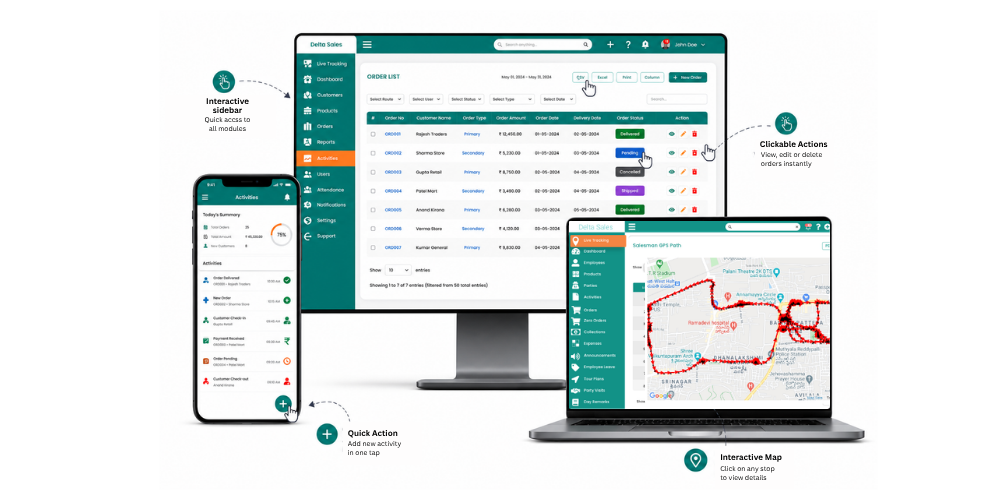
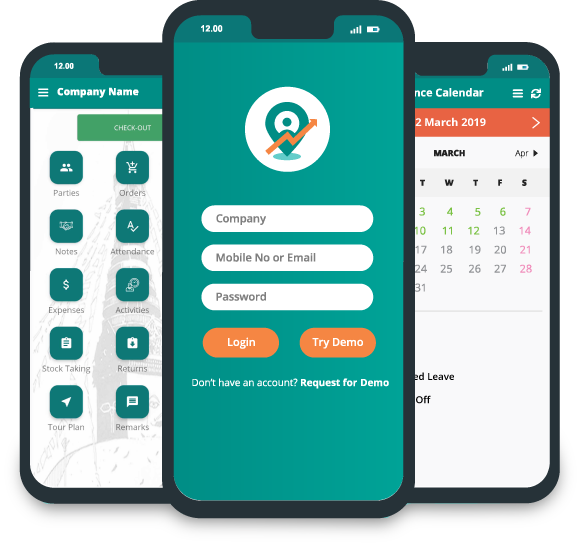
Delta Sales App is a field sales force automation and employee tracking platform for businesses that manage outside sales reps, distributors, and retailers. Its iOS app covers the daily work of field reps: they can manage customer visits, follow beat plans, record orders, and report market activity right from their phones. For an FMCG company, that means sales managers can stop gathering updates through calls and spreadsheets. They can watch field activity and review sales information in one central system.
Key features:
-
GPS-based employee tracking: Monitor representative locations and travel activities.
-
Party and customer management: Access customer information and GPS-based outlet locations.
-
Beat and tour planning: Assign routes and organize daily and multi-day field schedules.
-
Visit tracking: Record customer visits and monitor time spent at outlets.
-
Order management: Allow representatives to book customer orders from the field.
-
Zero-order reporting: Record outlets visited without receiving an order.
-
Payment collection: Track outstanding payments and record collections.
-
Stock taking: Capture product-wise stock information at retail outlets.
-
Attendance and leave management: Manage employee attendance and leave applications.
-
Expense reporting: Submit and review field-related expenses.
-
EOD reporting and analytics: Review daily activities and sales performance.
One useful thing about it is how it ties beat planning to what actually happens in the market. Managers can set planned outlet coverage against completed visits and look at zero-order visits, so they aren't relying on order figures alone. The platform also supports offline fieldwork, and the information syncs once an internet connection is available. That helps reps covering remote territories or areas where the network is patchy.
Best suited for: FMCG companies, manufacturers, wholesalers, distributors, and businesses managing field sales representatives across multiple territories.
Consideration: Businesses should evaluate the available modules, reporting requirements, and configuration during implementation to ensure the application matches their existing sales and distribution workflows.
2. WEX Field Service Management
WEX Field Service Management is built for service businesses like HVAC contractors, plumbers, and other trades. It helps organizations coordinate field employees, manage customer appointments, and handle service-related operations.
Key features:
-
Job scheduling and dispatch management.
-
GPS-based field employee visibility.
-
Customer records and service history.
-
Estimates, invoicing, and payments.
-
Route planning and reporting.
Best suited for: HVAC companies, contractors, plumbing businesses, and field service organizations.
Consideration: Its primary focus is service management rather than FMCG distribution, beat planning, and secondary sales automation.
3. Veloxy
Veloxy is a sales productivity platform for organizations that use Salesforce CRM. It helps reps manage leads, customer information, sales activities, and follow-ups while they're working away from the office.
Key features:
-
Salesforce CRM integration.
-
Lead and contact management.
-
Route optimization.
-
Geolocation-based prospect discovery.
-
Sales activity tracking.
-
Automated CRM data entry.
Best suited for: B2B sales organizations and enterprise teams using Salesforce.
Consideration: Businesses that do not use Salesforce may need additional CRM investment. Its focus is more on sales pipeline management than distributor and retail operations.
4. FieldPie
FieldPie is a mobile CRM and field force management platform that helps businesses coordinate employees working in different locations. It has tools for monitoring field activity, managing customer visits, and collecting information.
Key features:
-
GPS-based employee tracking.
-
Customer and contact management.
-
Visit and activity reporting.
-
Task scheduling.
-
Field team monitoring.
-
Performance reports.
Best suited for: Businesses managing distributed employees, field representatives, and customer visits.
Consideration: Businesses with complex FMCG distribution requirements should evaluate its order booking, collection, and stock management capabilities.
5. FieldStacker
FieldStacker focuses on door-to-door sales and neighborhood-based prospecting. It helps reps manage leads, organize territories, and record customer interactions while they're out in the field.
Key features:
-
Lead and prospect management.
-
Territory mapping.
-
Sales activity tracking.
-
Follow-up management.
-
Team visibility.
-
Offline activity recording.
Best suited for: Solar companies, roofing businesses, and door-to-door sales organizations.
Consideration: Its prospecting-focused workflow may not suit businesses requiring distributor management, SKU-wise order booking, and retail outlet reporting.
6. OctopusPro
OctopusPro is a field service management platform for businesses coordinating mobile workers and customer appointments. It helps managers schedule jobs, assign employees, and monitor service activities.
Key features:
-
Job and appointment scheduling.
-
Customer management.
-
Fieldworker tracking.
-
Job status updates.
-
Mobile invoicing and payments.
-
Photo and document collection.
Best suited for: Cleaning companies, maintenance businesses, and home-service providers.
Consideration: Its main focus is service appointments and job management rather than traditional field sales and distribution operations.

7. Knockio
Knockio provides field sales and canvassing tools for businesses that generate customers through door-to-door visits. It helps representatives capture leads, manage territories, and track follow-up activities.
Key features:
-
Lead and sales pipeline management.
-
Territory mapping.
-
GPS-based tracking.
-
Route planning.
-
Appointment management.
-
Sales activity reporting.
Best suited for: Solar businesses, home-service companies, and door-to-door sales teams.
Consideration: Businesses requiring FMCG-specific features such as beat-wise outlet coverage, stock taking, and distributor order management should evaluate its capabilities carefully.
8. TrackoField
TrackoField focuses on monitoring field employees and managing distributed workforces. It gives visibility into employee locations, attendance, and assigned activities.
Key features:
-
Real-time employee tracking.
-
Geo-verified attendance.
-
Task management.
-
Field activity monitoring.
-
Employee coordination.
-
Workforce reporting.
Best suited for: Organizations managing geographically distributed employees and mobile workforces.
Consideration: Its primary strength is workforce management. Businesses looking for comprehensive sales automation should check its order management, collection, and retail execution capabilities.
9. Repsly
Repsly is a retail execution platform for consumer goods companies and merchandising teams. It helps businesses manage store visits, run retail audits, and keep an eye on product availability.
Key features:
-
Store visit tracking.
-
Retail audits and surveys.
-
Photo submissions.
-
Inventory audits.
-
Route planning.
-
Order placement.
-
Field team reporting.
Best suited for: FMCG brands, consumer goods companies, and merchandising teams.
Consideration: Businesses with complex distributor management and payment collection requirements should assess whether their workflows match their needs.
10. SimplyDepo
SimplyDepo is a field sales and distribution platform for CPG brands, distributors, and retail sales teams. It supports mobile order entry, inventory-related activities, and retail execution.
Key features:
-
B2B mobile order booking.
-
Product and pricing management.
-
Offline order entry.
-
Inventory management.
-
Route planning.
-
Retail execution reporting.
-
Sales dashboards.
Best suited for: CPG brands, distributors, and B2B retail sales organizations.
Consideration: Businesses should evaluate their party-wise pricing, payment collection, and distributor reporting capabilities before implementation.
What a Sales Manager Needs From an iOS Field Sales App
An effective iOS field sales app should make daily fieldwork easier for representatives while giving managers reliable information about sales activities. Before comparing platforms, it helps to understand the capabilities that matter most in distribution-led sales operations.
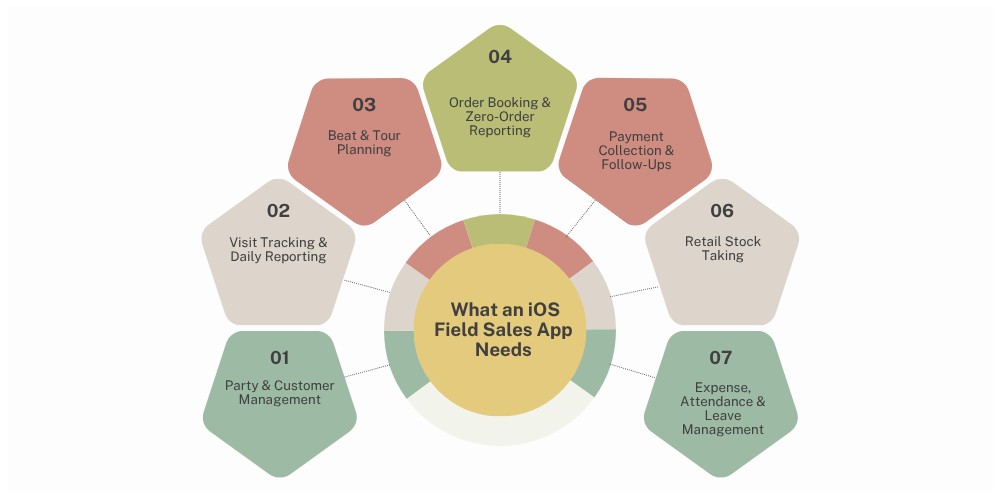
1. Party and customer records in the field
Reps should be able to pull up customer and party information straight from their iPhones: outlet names, contact details, addresses, GPS coordinates, previous orders, outstanding balances, and any notes on the customer. With those records on hand during a visit, nobody has to carry a paper register or keep calling the distributor's office. Reps can also prepare before they walk in by checking previous purchases and pending payments. For FMCG and manufacturing businesses, customer records work best when they're organized by distributor, territory, beat, and outlet type.
2. Visit tracking and daily activity reporting
Visit tracking shows managers whether reps are keeping to their schedules and reaching the outlets they're supposed to. A good app records check-in and check-out times, visit duration, GPS location, and visit outcomes. Managers should also be able to tell productive visits from unsuccessful ones and spot the outlets where no order was placed. Daily activity reporting then pulls these details into a DSR (Daily Sales Report). Managers no longer have to collect updates by phone at the end of the day. They can review visits, orders, collections, and pending activities from one dashboard.
3. Beat plans and tour plans
Beat planning decides which outlets reps visit and in what order. Tour planning organizes field activity across several days or territories. An iOS field sales app should let managers assign beats, schedule customer visits, and compare planned coverage against actual. Reps should be able to see their assigned routes and pull up outlet locations while they travel. This matters most for businesses with large retail networks. Without a structured beat plan, reps tend to keep returning to outlets they know and miss the customers who could actually produce sales.
4. Order booking, including zero orders
Mobile order booking lets reps record customer orders during market visits. They should be able to pick products, enter quantities, check the applicable prices, and submit the order without going back to the office. One requirement that often gets missed during software selection is zero-order reporting. A rep may visit an outlet and come away with no order because the retailer has enough stock, is waiting on payment clearance, or just doesn't need a refill. Recording those visits separately shows managers how much of the market is really being covered, which order volume alone can't tell them.
5. Collections and payment follow-up
In distribution, sales performance and payment recovery go hand in hand. Reps often collect outstanding payments, chase overdue invoices, and update customer payment records. The app should show outstanding balances and let authorized reps record collections during customer visits. Managers can then look at collection performance next to order booking and see whether sales growth is actually turning into cash.
6. Stock taking at the outlet
Stock taking lets reps record what's actually on the shelf at retail outlets. That information helps spot low-stock SKUs, track product movement, and plan replenishment. For FMCG companies, outlet-level stock data can show sales managers where distribution gaps are and why a particular product isn't bringing in the orders they expected. Look for an app that supports product-wise stock entry and makes what's recorded available for reporting and analysis.
7. Expenses, odometer readings, and leaves
Field reps run up travel, food, accommodation, and other business expenses, and logging them by hand creates more admin work. A suitable mobile sales app should handle expense submissions, supporting documents, and travel records like odometer readings where they apply. Attendance and leave management matter just as much. Managers should be able to review attendance records, keep track of leave applications, and know who's available before they assign the day's beats.
How to Choose the Right iOS Field Sales App For Your Team
Picking an app only on its mobile interface or its feature count can cause problems once you've implemented it. The right platform should fit the size of your sales team, your distribution model, your reporting requirements, and the field processes you already run. Five areas are worth checking before you decide.
1. By team size
The number of representatives you manage affects software requirements, implementation complexity, and subscription costs. A business with five sales representatives may only need customer records, visit tracking, order booking, and basic reporting. A company managing 100 or more representatives across multiple territories may require additional capabilities. Consider the following:
-
Small teams: Prioritise ease of use, customer management, attendance, and basic activity reporting.
-
Medium-sized teams: Look for beat planning, GPS tracking, order management, collection reporting, and team-level dashboards.
- Large teams: Evaluate role-based access, multi-territory management, distributor coordination, advanced analytics, and integration capabilities.
Also consider how easily the platform can accommodate additional representatives without making administration unnecessarily complicated.
2. By industry
Different industries have different field sales requirements. An application designed for door-to-door prospecting may not be suitable for an FMCG distributor managing hundreds of retail outlets. Consider these examples:
|
Industry |
Important Capabilities |
|---|---|
|
FMCG |
Beat planning, outlet visits, order booking, stock taking |
|
Pharmaceuticals |
Customer visits, territory management, product information |
|
Building Materials |
Dealer management, order tracking, collections |
|
Paint Distribution |
Retailer coverage, SKU management, order reporting |
|
Electrical and Hardware |
Dealer visits, product catalogues, secondary sales |
|
B2B Manufacturing |
Customer records, sales pipeline, order management |
Choose software that supports the activities your representatives perform regularly rather than adapting your entire sales process around a platform.
3. By how your reps plan their beats and tours
If representatives visit multiple outlets every day, beat planning should be a major selection criterion. Check whether the application allows managers to:
-
Create and assign territory-wise beat plans.
-
Schedule customer visits.
-
Prepare multi-day tour plans.
-
Access outlet locations through maps.
-
Monitor completed and pending visits.
-
Compare planned routes with actual field activities.
For example, a representative assigned 25 outlets across a territory should be able to access the day's route and update each visit without maintaining a separate paper schedule. A well-organized beat plan also makes it easier to identify outlets that are regularly missed.
4. By how much order, collection, and stock data do you need to capture
Sales activity does not end when a representative checks in at an outlet. Depending on your business model, the same visit may involve order reporting, payment collection, stock verification, product returns, and reporting market observations. Before choosing an application, identify the information your managers need after every visit. For distribution-led businesses, important capabilities include:
-
Product catalogues and SKU-wise order entry.
-
Party-specific pricing and schemes.
-
Zero-order reporting.
-
Outstanding payment visibility.
-
Cash and cheque collection records.
-
Retail outlet stock taking.
-
Distributor and customer management.
-
Daily sales and collection reports.
The objective is to capture relevant information during the visit rather than asking representatives to reconstruct their activities at the end of the day.
5. By total cost, including per-user fees and onboarding
Subscription pricing is only one part of the software investment. A platform may appear affordable initially but become expensive when additional representatives, reporting modules, integrations, or onboarding services are included. Evaluate the following costs:
-
Monthly or annual subscription charges.
-
Per-user pricing and minimum user requirements.
-
Additional module charges.
-
Data migration and onboarding.
-
Integration and customization costs.
-
Training and ongoing support.
Ask vendors for a demonstration using your actual sales workflow. This helps you understand whether the software can support your operations without requiring extensive changes.
How to Roll Out a Field Sales App So Reps Actually Use It
Choosing the right software is only the first step. Successful implementation depends on how well the application fits into representatives' everyday routines. A complicated rollout can lead to incomplete visit records, delayed order submissions, and representatives continuing to maintain separate spreadsheets. A structured implementation helps avoid these problems.
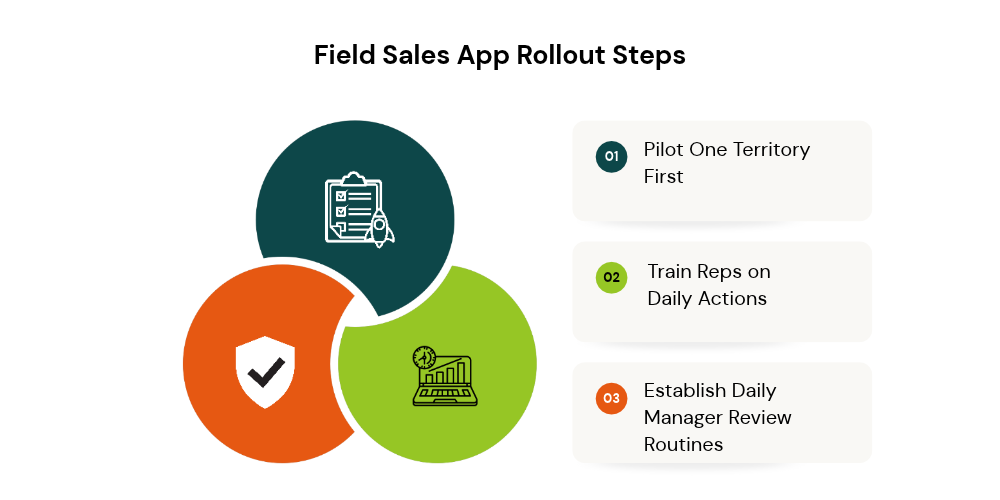
1. Pilot with one territory first
Avoid introducing the application to the entire sales organization immediately. Start with one territory or a small group of representatives. Use the pilot to understand how the application performs during actual market visits. Monitor:
-
Whether representatives can access customer information easily.
-
How accurately visits are recorded.
-
Whether orders are submitted correctly.
-
How beat plans work in practice.
-
Whether information synchronizes reliably.
-
Which activities create unnecessary steps.
2. Train reps on the 3–4 daily actions that matter.
Representatives do not need to understand every software module before starting fieldwork. Training should focus on the activities they perform most frequently:
-
Mark attendance and start the assigned beat plan.
-
Check in at customer outlets and record visit information.
-
Submit orders, zero orders, or stock details.
-
Complete collections and submit the end-of-day report.
Demonstrate these activities using realistic customer and order scenarios. Managers should also explain why accurate reporting matters. When representatives understand how visit records and order information help improve territory planning, they are more likely to follow the process consistently.
3. Set manager review routines around the end-of-day report.
An application becomes useful when managers regularly act on the information it collects. Establish a daily review routine around the EOD report. Instead of checking only total sales, review the activities that contributed to those results. A practical manager review should include:
-
Planned versus completed outlet visits.
-
Total productive and zero-order visits.
-
Orders booked and sales achieved.
-
Payments collected and outstanding balances.
-
Stock availability and reported shortages.
-
Attendance and travel records.
-
Pending activities and follow-ups.
For example, if a representative completes most assigned visits but records very few orders, managers can investigate whether the issue relates to retailer demand, product availability, pricing, or outstanding payments. This makes the application a tool for improving sales operations rather than simply monitoring employees.
Final Thoughts
Choosing the right iOS field sales app depends on your team's daily activities, industry requirements, and distribution model. While some platforms focus on CRM and lead management, others specialize in employee tracking, retail execution, or field service operations.
For FMCG companies, manufacturers, wholesalers, and distributors, the priority should be connecting field activities with actual sales performance. Managing beat plans, tracking outlet visits, booking orders, recording collections, and monitoring stock should not require multiple disconnected tools. Delta Sales App brings these essential field sales activities together in one platform, helping businesses improve territory coverage, monitor representative performance, and gain better visibility into daily sales operations.
Looking to simplify field sales management and improve control over your distribution network? Get a personalized product demo and discover how Delta Sales App can support your field sales team.