How Field Sales Teams Can Manage Expenses From Their Phones

Field sales reps spend most of their working day away from the office. They travel between customer locations, meet distributors, visit retail outlets, sit in business meetings, and cover their assigned territories. Along the way, they run up expenses: fuel, transport, meals, accommodation, parking, and other work costs.
Recording those expenses is rarely as simple as paying for them. A rep may have to hang on to physical bills, track costs separately, send receipt photos to a manager, and fill in reimbursement forms once they're back at the office. When information is logged late or scattered across several channels, expense reporting becomes a headache for employees and finance.
Mobile expense management gives field teams a more organized way to handle it. Reps don't have to wait until the end of the day or month. They can log expenses from their phones, attach supporting documents, and submit claims while they're still in the field. Managers then review the submissions and watch spending through one central process.
This blog covers how field sales teams can manage expenses from their phones, what managers should look for in a mobile expense process, and how digital expense reporting improves visibility and accountability.
Why Paper Bills and Month-End Claims Fail Field Sales Teams
Traditional expense reporting often depends on physical receipts, spreadsheets, paper forms, and messages exchanged between employees and managers. These methods may work for a small team with limited travel, but they become difficult to manage when representatives cover multiple territories and visit several customers every day. The problem is not simply the time spent entering expenses. Delayed reporting also affects the accuracy of records, the speed of approvals, and the company's ability to understand field spending.
1. What Reps Lose When Claims Wait Until They Return to the Office
Field representatives usually have a packed schedule. After completing customer visits, they may need to place orders, collect payments, update visit records, and prepare for the next day's route. Expense reporting often becomes another task they postpone until they have time. When claims are delayed, several issues can arise:
-
Forgotten transactions: Reps may struggle to recall the exact amount or purpose of smaller expenses after several days.
-
Missing receipts: Physical bills can get misplaced, damaged, or mixed with other documents.
-
Incomplete information: Employees may forget to mention the customer visit, business purpose, or expense category associated with a transaction.
-
Delayed reimbursements: Managers and finance teams cannot process claims until the required information is submitted.
-
Additional administrative work: Employees may have to spend time organizing old bills and completing forms instead of focusing on field activities.
Recording expenses closer to the time they occur helps reduce this dependence on memory and makes the reporting process more consistent.
2. How WhatsApp Photos and Excel Sheets Hide Field Spending
Some organizations collect receipt photos in WhatsApp groups and keep expense records in Excel. Both are familiar, and neither makes a dependable expense process. A rep might send a receipt photo to a manager, type the amount into a spreadsheet, and then file a formal reimbursement claim later. The same transaction ends up recorded in three places, and that causes trouble:
-
Receipt photos get buried among unrelated messages.
-
Each employee may use a different spreadsheet format.
-
Managers get duplicate or incomplete submissions.
-
Finance has to consolidate information from several sources by hand.
-
Nobody has one consistent view of which claims are submitted, approved, or still pending.
Moving from manual records to a mobile-based process offers benefits beyond convenience. It can improve expense accuracy, provide managers with better spending visibility, simplify approval workflows, and make financial reporting easier. Businesses considering this shift can explore the benefits of using field sales apps for expense management to understand how mobile tools support more organized expense tracking.
How Field Reps Submit Expenses From Their Phones
A mobile expense reporting process allows representatives to record business-related spending without returning to the office. Instead of collecting bills for later submission, they can use their phones to enter expense details and attach supporting documents. The exact steps depend on the software an organization uses, but an effective process should make expense submission straightforward and consistent.
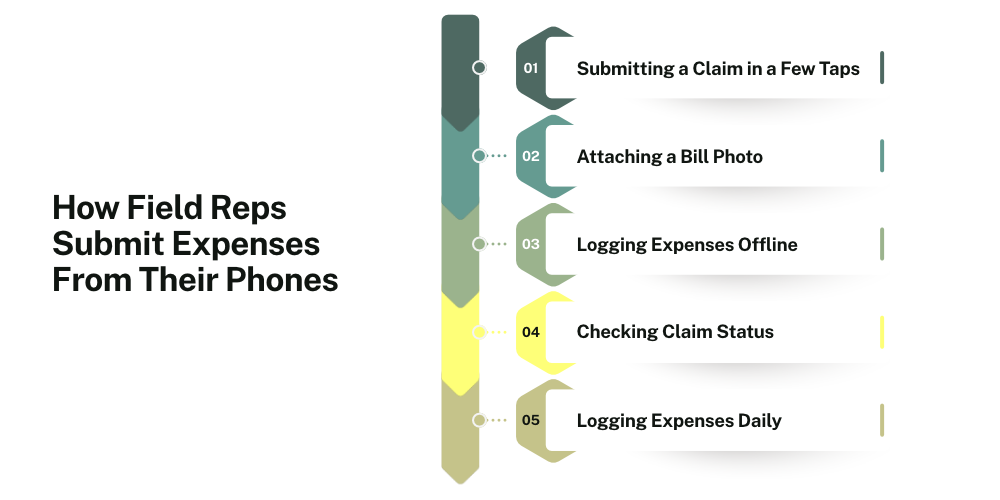
Submitting a Claim in a Few Taps
Representatives should be able to submit expenses without completing lengthy forms. A mobile expense form can collect essential details such as:
-
Expense amount
-
Expense category
-
Transaction date
-
Business purpose or description
-
Supporting receipt or bill
Using a standardized form keeps records consistent and helps managers review claims without repeatedly requesting missing information.
Attaching a Bill Photo From the Phone Camera
Reps no longer need to hold on to paper receipts until they're back at the office. They can photograph the bill with their phone and attach it to the expense entry. The usual steps are entering the amount, picking a category, uploading the receipt photo, and submitting the claim. That keeps the transaction details and the supporting document in one place, so managers can verify a claim without hunting for the receipt.
Logging Expenses Without an Internet Connection
Reps often work where internet connectivity is unreliable. If the expense app supports offline entry, they can record expenses without a connection and sync them when it comes back. Businesses should check that offline mode covers the specific expense features they plan to use, since support can vary. Done properly, it cuts down on missing records and late reports.
Checking Claim Status Without Chasing the Manager
Reps also want to know what happens after they submit a claim. A digital approval process lets them check the status without pestering their manager. Common claim statuses are:
-
Submitted: the claim has been sent for review
-
Pending: the claim is waiting for approval
-
Approved: the claim has been accepted
-
Rejected: the claim has not been approved
-
Needs clarification: more information or documents are required
Clear status updates cut down on unnecessary follow-ups, and reps can see where each claim stands.

Building the Habit of Logging Expenses the Same Day
Consistent expense reporting starts with logging each transaction when it happens. Businesses can build that habit by:
-
Asking reps to log expenses right after each transaction
-
Keeping expense categories simple and clear
-
Spelling out receipt and documentation requirements
-
Setting regular submission deadlines
-
Giving basic training on the reporting process
Entering expenses regularly prevents forgotten transactions, missing receipts, and month-end reporting delays. It also keeps spending records current for managers and finance.
How Delta Sales App Handles Field Expense Reporting
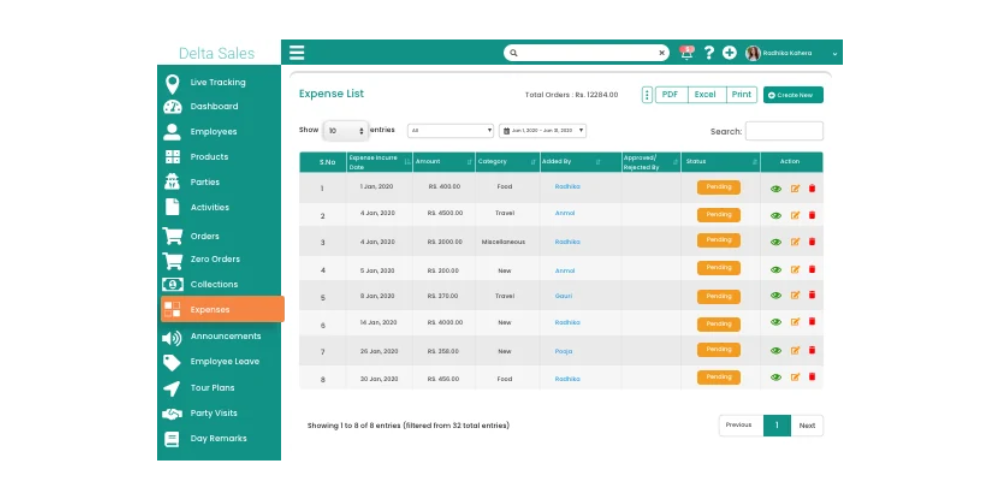
For businesses with reps spread across several territories, expense reporting should connect to the wider field sales process. A separate spreadsheet workflow makes it hard to see how employee activity and operating costs relate to each other. Delta Sales App has a field expense reporting module that helps businesses organize expense submissions and review field spending through one central system. Reps record expenses from their mobile devices, and managers review what's been submitted and follow claims through the approval process the company has configured. Key capabilities include:
-
Mobile Expense Entry
Reps can log business expenses in the app, so they don't have to depend on paper forms or separate spreadsheets. That gives the business one consistent record of what gets spent during field operations. Companies can set up expense categories to match their own policies, such as fuel, travel, meals, and other approved costs.
-
Receipt Photo Capture
Reps can attach receipt images to their expense entries. With the supporting document sitting next to the transaction, managers can review a claim and keep tidy records more easily. It also means nobody has to gather physical bills separately for each submission.
-
Expense Approval Workflow
Managers can review expense submissions and approve or reject claims through the configured workflow. That's more structured than handling each request through individual messages or paper forms. A defined approval process also helps with accountability, since it's clear who is responsible at each review stage.
-
Expense Reports and Spending Visibility
Expense reporting helps managers review field spending and understand how costs are distributed across representatives and expense categories. These records can support routine budget reviews, internal checks, and decisions about field operating costs.
-
Connected Field Sales Operations
Expense reporting is one part of managing a field sales team. Businesses also need visibility into customer visits, employee activities, sales orders, attendance, and territory coverage. Using a broader field sales management platform can help organizations bring these operational activities into a more coordinated workflow.
Businesses looking for a more detailed explanation of the platform can read our guide on automating and tracking sales expenses in the field with Delta Sales App.
Conclusion
Managing field expenses through paper bills, scattered messages, and month-end spreadsheets creates needless work for reps, managers, and finance. Late submissions lead to missing receipts, inaccurate records, approval bottlenecks, and little visibility into what operations actually cost. Mobile expense management is a more organized way to do it. Reps record transactions from their phones, attach supporting documents, and submit claims through a defined process. Managers review expenses, follow approvals as they move along, and analyze spending across teams and territories.
What works best pairs easy mobile submission with clear expense policies, consistent approval procedures, and reliable reporting. For businesses that want better visibility across field activity and expenses, Delta Sales App folds expense reporting into a broader field sales management workflow.
Get a Personalized Product Demo to see how Delta Sales App can support your field expense reporting and sales operations.